Webdings vs Wingdings: What’s the Difference? Complete Guide (2026)
Webdings and Wingdings are two of the most recognizable symbol fonts ever created. Instead of displaying traditional letters and numbers, these fonts transform characters into icons, symbols, and pictographs. Although many people use the terms interchangeably, Webdings and Wingdings are different fonts with unique symbol collections and purposes.
Whether you’re trying to decode strange symbols, use a translator, or simply understand how these iconic fonts work, this guide explains everything you need to know about Webdings vs Wingdings.
What Is Wingdings?
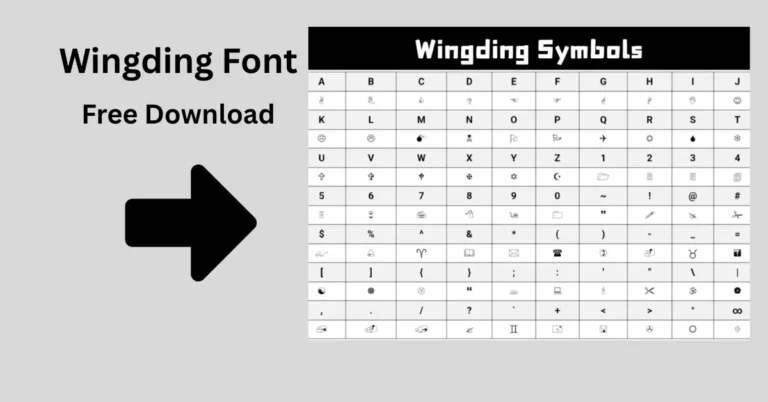
Wingdings is a symbol font developed by Microsoft and introduced in the early 1990s. Rather than displaying alphabetic characters, Wingdings converts typed letters into symbols such as:
- Arrows
- Hand gestures
- Checkmarks
- Stars
- Religious symbols
- Office icons
- Miscellaneous pictographs
For decades, Wingdings has been included with Microsoft Windows and Microsoft Office, making it one of the most widely recognized dingbat fonts in the world.
Common Uses of Wingdings
People use Wingdings for:
- Decorative documents
- Symbol-based lists
- Educational projects
- Graphic design elements
- Creating visual shortcuts in documents
What Is Webdings?
Webdings is another symbol font developed by Microsoft. It was released several years after Wingdings and includes a different set of pictographic symbols.
Webdings was designed during the growth of the internet era and contains symbols related to communication, technology, navigation, and everyday activities.
Some common Webdings symbols include:
- Globe icons
- Email-related symbols
- Communication icons
- Transportation symbols
- Technology graphics
- Navigation symbols
Although Webdings never became as famous as Wingdings, it remains popular among designers and users interested in symbol-based typography.
Webdings vs Wingdings: Quick Comparison
| Feature | Wingdings | Webdings |
|---|---|---|
| Release Year | 1990 | 1997 |
| Font Type | Symbol Font | Symbol Font |
| Developer | Microsoft | Microsoft |
| Focus | General symbols and pictographs | Web and communication-themed symbols |
| Popularity | Very High | Moderate |
| Windows Support | Yes | Yes |
| Microsoft Office Support | Yes | Yes |
| Decorative Usage | Excellent | Excellent |
Key Differences Between Webdings and Wingdings
1. Different Symbol Sets
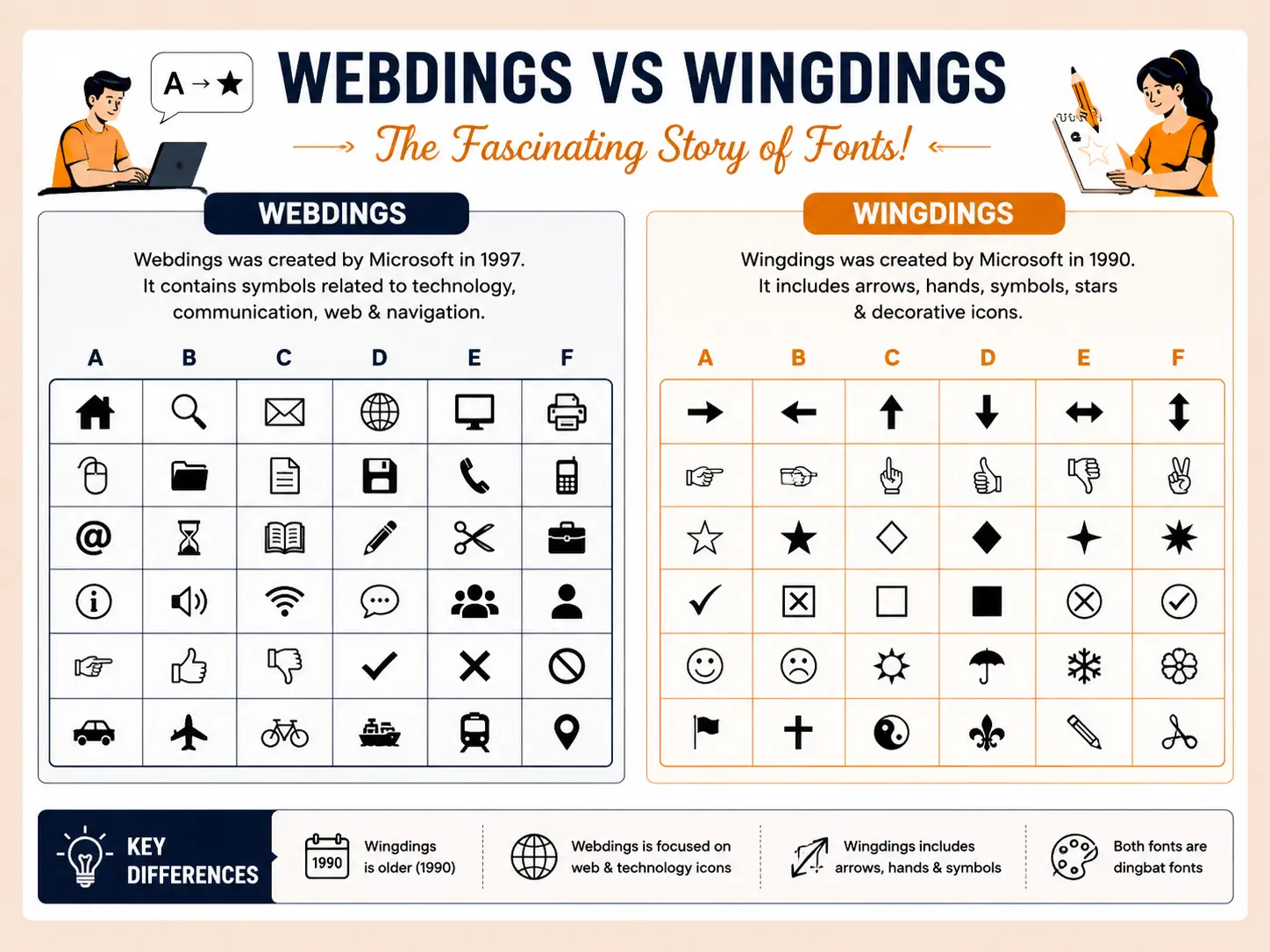
The biggest difference is the collection of symbols each font contains.
Wingdings includes:
- Arrows
- Check marks
- Hands
- Stars
- Geometric shapes
- Miscellaneous icons
Webdings includes:
- Communication symbols
- Technology-related icons
- Transportation graphics
- Navigation elements
- Web-inspired pictographs
Even when the same letter is typed, the resulting symbol often differs completely between the two fonts.
2. Design Purpose
Wingdings was designed primarily as a universal symbol font for general use.
Webdings was created later and reflected the growing importance of computers, communication, and internet-related graphics.
3. Visual Style
Wingdings symbols often appear more playful and decorative.
Webdings symbols tend to be cleaner and more modern, emphasizing communication and technology themes.
4. Character Mapping
Each font assigns symbols differently.
For example, typing a specific letter in Wingdings may generate an arrow, while the same character in Webdings could display a communication icon or another unrelated symbol.
Why Do People Confuse Webdings and Wingdings?
Many users assume the fonts are identical because:
- Both are included with Windows.
- Both replace text with symbols.
- Both belong to the dingbat font category.
- Their names sound similar.
However, once you compare the actual symbols, the differences become obvious.
What Are Dingbat Fonts?
A dingbat font is a typeface that replaces traditional letters with decorative symbols, icons, and ornaments.
Popular dingbat fonts include:
- Wingdings
- Webdings
- Wingdings 2
- Wingdings 3
These fonts were especially popular before modern emoji systems became widely available.
Webdings and Wingdings in the Modern Era
Today, Unicode and emoji standards have largely replaced symbol fonts for everyday communication.
However, Webdings and Wingdings still remain useful for:
- Graphic design
- Educational demonstrations
- Historical computing projects
- Symbol generation
- Font experimentation
Many users also enjoy translating regular text into Wingdings or Webdings for fun.
Can You Translate Webdings and Wingdings?
Yes. Online translators allow users to:
- Convert normal text into Wingdings.
- Convert Wingdings back into readable text.
- Translate text into Webdings symbols.
- Decode symbol-based messages.
These tools are especially useful when trying to understand unusual documents or symbol-based content.
Are Webdings and Wingdings Unicode Compatible?
Modern operating systems primarily rely on Unicode for symbol representation.
Although many Wingdings and Webdings symbols now have Unicode equivalents, the fonts themselves are not considered Unicode standards.
As a result:
- Symbols may not display correctly on all devices.
- Some applications may substitute alternative characters.
- Cross-platform compatibility can vary.
Which Is Better: Webdings or Wingdings?
The answer depends on your purpose.
Choose Wingdings if you need:
- General symbols
- Arrows and checkmarks
- Decorative document icons
- Traditional symbol collections
Choose Webdings if you need:
- Communication-related symbols
- Technology-themed graphics
- Internet-inspired pictographs
- Modern icon styles
Neither font is objectively better; they simply serve different visual needs.
Frequently Asked Questions
Is Webdings the same as Wingdings?
No. They are separate Microsoft symbol fonts with different symbol collections and character mappings.
Which came first, Webdings or Wingdings?
Wingdings was released first. Webdings was introduced several years later.
Can I use Webdings and Wingdings on Windows?
Yes. Both fonts are available on many Windows systems and can be used in supported applications.
Why do letters become symbols in Wingdings?
Because Wingdings replaces alphabetic characters with predefined pictographic symbols.
Are Webdings and Wingdings still used today?
Yes. While less common than Unicode emojis, they remain popular for design projects, education, and online translation tools.
Final Thoughts
The debate between Webdings vs Wingdings isn’t about which font is better—it’s about understanding their unique purposes. Both fonts transformed ordinary text into visual symbols long before emojis became mainstream. Wingdings focuses on general-purpose icons and decorative symbols, while Webdings emphasizes communication, technology, and web-inspired graphics.
Whether you’re decoding symbols, creating creative designs, or exploring the history of digital typography, understanding the differences between Webdings and Wingdings helps you choose the right symbol font for any project.