Wingdings Translator
Convert text to and from Wingdings fonts
Our translator handles all major Wingdings versions; Wingdings 1, Wingdings 2, Wingdings 3, and even Webdings. You don’t have to worry about compatibility; the tool ensures accurate results no matter which version you use, making it perfect for students, designers, and puzzle creators alike.
Enter Text
Total Characters (With Space): 0 | Total Characters (Without Space): 0 | Total Words: 0 | Total Paragraphs: 0 | Total Sentences: 0
Wingdings
Wingdings 2
Wingdings 3
Webdings
Decoded Text
What Is Wingdings?
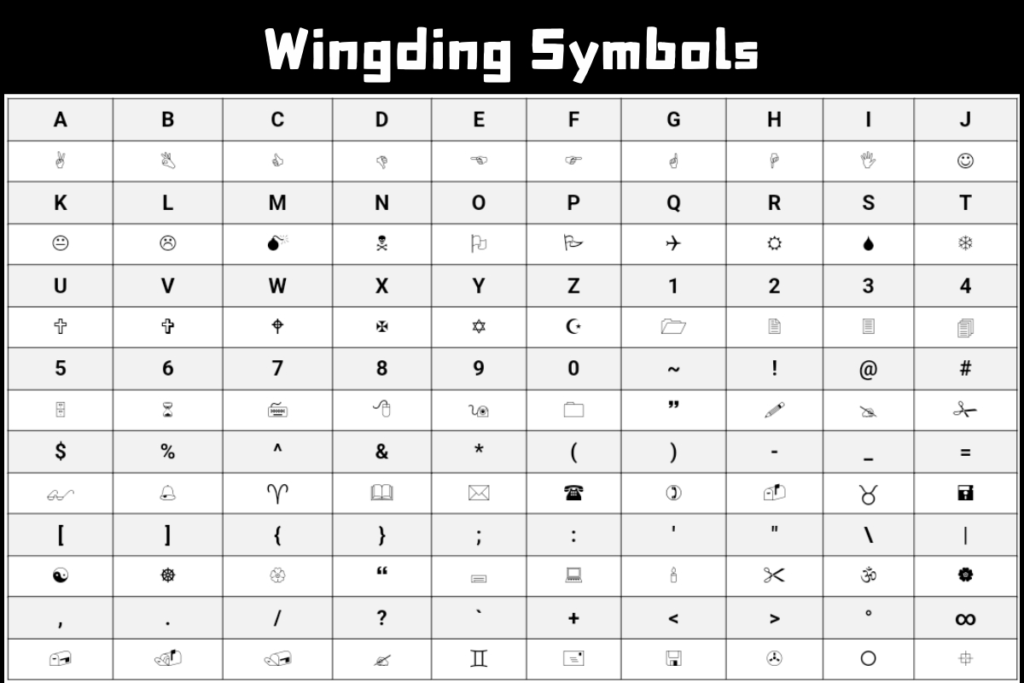
Wingdings is a special font made up of symbols instead of letters. Instead of seeing A, B, C, you see icons like arrows, stars, hands, or shapes. It was first created by Microsoft in the 1990s and became popular because it looked unique and mysterious.
What Is a Wingdings Translator?
A Wingdings Translator is an online tool that converts:
Instead of guessing what the symbols mean, you type or paste your text in, click a button, and the tool shows the converted version instantly. Your Wingdings Translator tool makes this process easy, fast, and accurate; no downloads or special software are required.
How to Use the Wingdings Translator
Using a Wingdings translator is simple. You don’t have to be tech‑savvy. Here are the steps for both directions:
Convert English to Wingdings
This is great for creating:
Translate Wingdings to English
Many people on forums ask, “Is there a tool that actually reads Wingdings?” Yes; this translator does it cleanly.
Why Use Our Wingdings Translator?
There are many Wingdings tools online, but ours stands out for real users. Here’s why:
Fast and Real-Time Conversion
You don’t have to wait for results. As soon as you type or paste your text, the translator instantly converts it into Wingdings symbols or back to English. This is perfect when you’re in a hurry or creating content on the fly, like social media captions, secret messages, or puzzle codes.
Works on All Devices
Whether you are on a smartphone, tablet, or desktop computer, the translator works seamlessly in your browser. You don’t need to download software, and it functions perfectly across different operating systems and browsers, making it accessible anywhere, anytime.

Easy to Copy and Reuse
Once your text is converted, you can copy the Wingdings symbols with a single click. Paste them directly into social media profiles, chat apps, documents, or graphic design software. This ease of use saves time and prevents errors that often happen with manual typing.

Secure and Private
All translations happen right in your browser. The tool does not store your text or share it with third parties. This ensures complete privacy for sensitive messages or creative projects.

Supports All Symbol Versions
Our translator handles all major Wingdings versions; Wingdings 1, Wingdings 2, Wingdings 3, and even Webdings. You don’t have to worry about compatibility; the tool ensures accurate results no matter which version you use, making it perfect for students, designers, and puzzle creators alike.
Why Use Our Wingdings Translator?
Wingdings Versions Explained
There isn’t just one Wingdings font. There are a few versions:
- Wingdings 1 – The classic symbols most people know.
- Wingdings 2 – More arrows and shapes.
- Wingdings 3 – Technical icons and directional signs.
Many tools only handle one version. Your Wingdings Translator understands all of them.
English to Wingdings – How It Works
When you convert English to Wingdings:
- Each English character gets matched with a symbol.
- Spaces stay spaces.
- The pattern stays readable by symbol rules.
For example:
- “HELLO” might turn into something like 😛🤔🥺🥺🧐
This conversion helps users make stylish text for bios, posters, and personal messages.
Wingdings to English – Decoding Symbols
People on social media often share mysterious symbols and ask:
“What does this mean?”
Forums like Reddit and Twitter have threads where users post symbol sequences and ask others to decode them. With a Wingdings translator, you don’t have to wait for replies or guess the meaning.
Just paste and translate.
This is especially useful for coding puzzles, scavenger hunts, and online challenges.
Wingdings Copy and Paste Guide
Once you get the symbols you want:
- Click Copy under the result.
- Paste it where you like Instagram, WhatsApp, Facebook, or documents.
Symbols will show up as long as the platform supports fonts or text characters.
Many users ask, “Will Wingdings show everywhere?” Most modern apps display symbols fine, but sometimes design tools or plain text systems may not.
Wingdings Text Generator vs Wingdings Converter
You might hear people say:
Though the words vary, they all aim to do the same thing turn letters into symbols or symbols back into letters. Your Wingdings Translator handles all these needs in one place.
Webdings Translator – What’s the Difference?
Webdings is another symbol font, similar to Wingdings but with different icons.
While Wingdings has hands, arrows, and shapes, Webdings includes symbols like houses, clocks, and more interface‑type icons.
Many people confuse the two. That’s why this translator also recognizes Webdings inputs.
Wingdings Alphabet & Symbols
Here’s the idea behind the alphabet:
Symbols can be anything from arrows to decorative shapes. People often copy symbols individually for design use.
Use Cases for Wingdings Translator
Here are some real reasons people love using a Wingdings Translator:
1) Secret Messages
Many students, puzzle enthusiasts, and online gamers use Wingdings to create hidden messages that only someone with a translator can read. It’s perfect for sharing notes, fun riddles, or clues in scavenger hunts. Using symbols instead of plain text adds an element of mystery and creativity.
2) Social Media Aesthetics
People love making their social media profiles unique. With a Wingdings Translator, users can craft interesting bios, stylish captions, or decorative posts that stand out. The symbols catch attention and make profiles more engaging without looking cluttered.
3) Graphic Designs
Designers often use Wingdings symbols in posters, banners, logos, and digital art. It allows them to add icons, arrows, or decorative shapes directly into text elements. A translator makes it easier to generate these symbols quickly without manually drawing or searching for icons.
4) Games & Puzzles
Gamers and puzzle creators often embed Wingdings symbols in challenges, online forums, and treasure hunts. Players need to decode these symbols to advance or find answers. Using a Wingdings Translator makes both creating and solving these puzzles simple and accurate.
5) Learning Symbol Fonts
Some learners and students explore Wingdings to understand how symbolic fonts were used in older text systems and digital design. Translators help them study the correspondence between letters and symbols and experiment with creating their own coded messages.
Pros & Cons of Wingdings Translator
Here are the main pros and cons of using a Wingdings translator:
|
Aspect |
Other Tools (Common Issues) |
Wingdings Translator |
|---|---|---|
|
Speed |
Slow/laggy |
Fast & instant |
|
Output |
Messy, broken symbols, hard to copy |
Clear & perfectly copyable |
|
Devices |
Poor on mobile/tablet, glitches |
Smooth on all devices |
|
Privacy |
Tracks data, ads, login often required |
Clean – no tracking or ads |
|
Accuracy |
Inaccurate/outdated mappings |
Reliable & precise |
|
Ease of Use |
Confusing UI/options |
Simple & beginner-friendly |
|
Versions |
Usually only Wingdings 1 (incomplete) |
Focused on standard – fully reliable |
|
Extras |
Gimmicks (e.g., image export, phrases) |
No fluff – fast & straightforward |
|
Overall Everyday Use |
Hit-or-miss (bugs, ads, risks) |
Highly reliable & hassle-free |
Final Thoughts
Wingdings may look confusing, but with the right tool, it becomes easy to read and create symbol text. Whether you want a fun design, a hidden message, or a cool social bio, your Wingdings Translator gives you instant results.